Notifications
rendimiento emails you when something needs your attention, so you don't have to watch the UI.
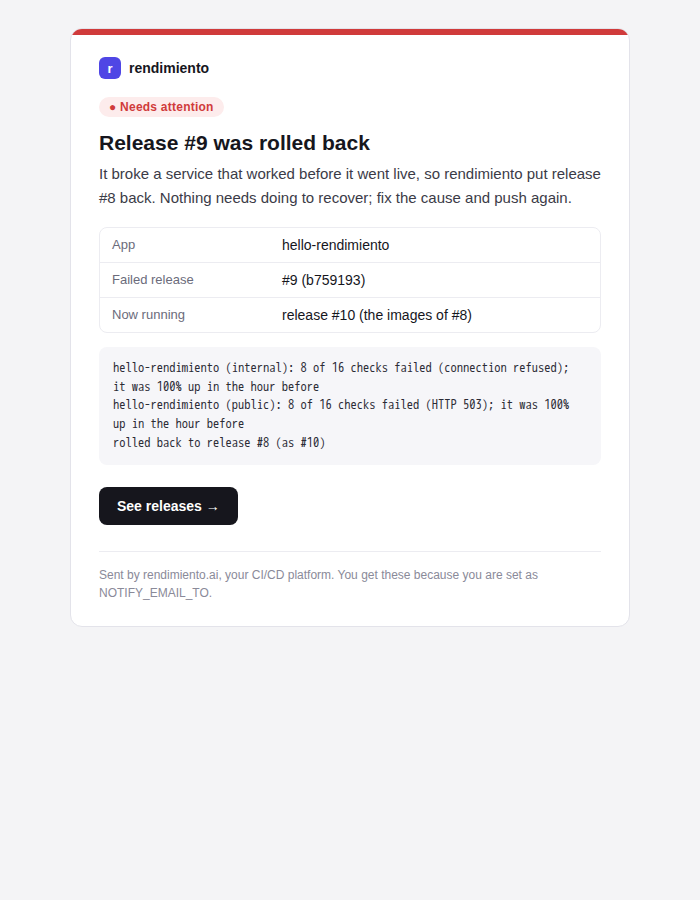
What you are told about
| Event | Sent by | |
|---|---|---|
| A release failed verification and was rolled back | ↩ app: release #9 rolled back: what broke, and what runs now | release verification (platform/verify.go) |
A release failed verification but was kept (verify.rollback: false, or nothing to roll back to) |
⚠ app: release #9 failed verification | release verification |
| A build on the default branch failed, so nothing was released | ✗ app: build failed on main: the failing steps and their errors | the CI worker (platform.execute) |
| A service went down: an outage opened after two failed checks | 🔴 app is down: which checks, since when, and the errors | uptime checks (uptime.Prober) |
| …and recovered | ✅ app recovered, with how long it was down | uptime checks |
Branch and pull-request builds don't email you; their result is on the commit's GitHub check.
Noise control
- One email per app per minute of changes. When several checks of an app go down together (its public URL and its in-cluster check), you get one email listing them all.
- No repeats. The same event (the same app down, the same release rolled back) is sent at most once every 30 minutes. A flapping service doesn't send a stream of emails.
- An hourly cap of 20 emails. Past it, emails are dropped and logged, so a bad night can't flood your inbox.
What an email contains
- a coloured bar and label: Needs attention (red), Warning (amber), Resolved (green);
- a heading and a one-line summary of what happened and whether you need to act;
- a small table of facts (app, release, commit, run, durations);
- the exact errors, in a box;
- a button to the right page: the run, the releases, or the Reliability tab.
There's also a plain-text version for mail clients that don't show HTML. The layout uses only tables and inline styles, which Gmail, Apple Mail and Outlook all render the same way.
Setting it up
Email is sent through Resend, from a sender on a domain verified there (here [email protected], shared with the cluster-update and StockFinancia emails).
# the API key, in its own secret (read by the platform's envFrom)
kubectl -n rendimiento-system create secret generic rendimiento-notify --from-literal=RESEND_API_KEY=re_…
| Setting | Where | Meaning |
|---|---|---|
NOTIFY_EMAIL_TO |
ConfigMap rendimiento |
Recipients, comma-separated. Empty turns email off. |
NOTIFY_LANG |
ConfigMap rendimiento |
en (default) or es: the language of the emails. |
NOTIFY_EMAIL_FROM |
ConfigMap | Sender (default rendimiento <[email protected]>); must be on a verified domain. |
RESEND_API_KEY |
Secret rendimiento-notify |
The Resend API key. |
Restart the platform after changing them. The Environment page's Email notifications check shows whether email is set up. Its Send test email button sends a sample right away and shows any error from the provider.
A key of its own
The key currently is the one StockFinancia uses. A separate Resend key just for rendimiento, allowed only to send, can be revoked without affecting the other apps.
In the code
| Piece | Where |
|---|---|
| Messages, the HTML and text template, de-duplication, the hourly cap, the Resend client | internal/notify |
| Outage and recovery emails, grouped per app per round | uptime.Prober.notifyChanges |
| Rollback and failed-run emails | platform.verifyMessage, platform.notifyRunFailed |
| The test email | POST /api/notifications/test |
Adding another channel (Discord, ntfy, Slack): implement notify.Sender, or turn a Message into that channel's format, and pick it in cmd/rendimiento/main.go from new settings. Everything that sends notifications goes through Notifier, so de-duplication and the cap apply to every channel.